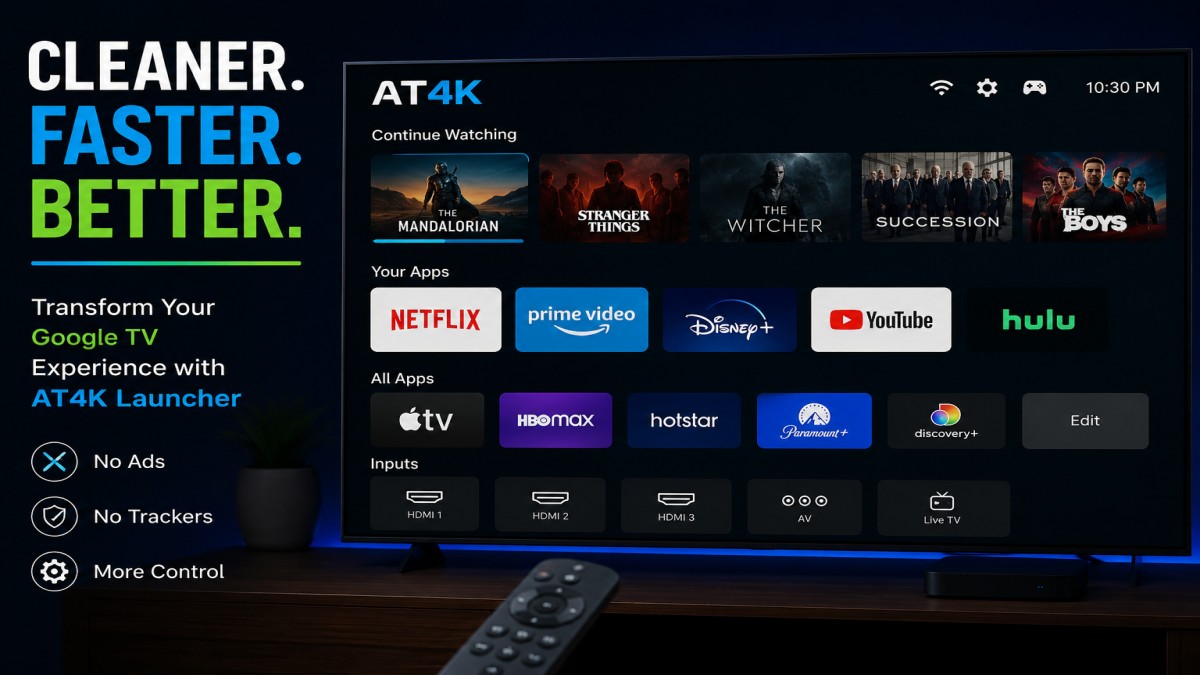
Modern smart TVs offer access to thousands of apps and streaming services, but many users find themselves frustrated by the overwhelming amount of content displayed on their screens. While Google TV delivers strong performance and broad app support, its default interface often prioritizes recommendations, promotions, and sponsored content over the apps people actually use.
For users looking for a simpler and more personalized experience, a free launcher called AT4K is emerging as an attractive alternative.
Why Many Google TV Users Want a Change
Google TV powers televisions from several major manufacturers and provides access to nearly every major streaming platform. However, one common complaint is the home screen itself.
Instead of highlighting installed apps, the interface often fills much of the screen with promotional banners, content suggestions, and recommendations. While some viewers appreciate these features, others prefer a cleaner environment focused on quick access to their favorite services.
This is where AT4K steps in.
What Is AT4K?
AT4K is a third-party launcher designed specifically for Google TV devices. Rather than filling the screen with recommendations and advertisements, it presents a streamlined interface that places apps front and center.
The launcher takes inspiration from minimalist TV operating systems and focuses on simplicity. Users are greeted with a straightforward layout that emphasizes functionality instead of promotional content.
Best of all, the core version is completely free to use.
A Cleaner and More Organized Interface
Once installed, AT4K replaces the busy appearance of Google TV with a much more focused design.
The interface includes:
- A simple navigation area with quick settings access
- Easy-to-read clock and connectivity indicators
- A dedicated section for recently watched content
- Quick access to favorite streaming services
- Organized lists of installed apps and connected inputs
The result is a home screen that feels less distracting and more efficient.
Instead of searching through multiple rows of recommendations, users can quickly launch the services they use every day.
Customizing the App Layout
One of the biggest advantages of AT4K is the ability to arrange apps exactly how you want them.
Users can select an application and reposition it within the interface, allowing frequently used services to remain easily accessible. Whether someone primarily watches Netflix, YouTube, Disney+, or another platform, their preferred apps can be placed at the top of the screen.
This flexibility helps reduce navigation time and creates a more personalized experience.
Taking Control of the Home Button
AT4K also offers options that allow it to function as the primary launcher on a Google TV device.
By enabling certain accessibility permissions, users can configure the launcher to open automatically when the television starts or when exiting other applications. This creates a more seamless experience and minimizes interactions with the default Google TV interface.
Depending on the television model, additional customization tools may be required to fully remap navigation buttons, but many users report successful results.
Hide Unwanted Apps and Services
Many smart TVs come with pre-installed applications that cannot easily be removed.
AT4K provides a practical solution by allowing users to hide apps they never use. Rather than seeing dozens of unnecessary icons cluttering the screen, users can choose exactly which applications appear on the home page.
This feature is particularly useful for televisions loaded with promotional apps or regional services that viewers have no interest in accessing.
Privacy-Focused Design
Another reason AT4K has gained attention among Google TV enthusiasts is its privacy-focused philosophy.
The developer has publicly emphasized a commitment to avoiding advertisements, analytics tracking, and intrusive data collection practices. In a market where many digital platforms rely heavily on user data and sponsored placements, this approach stands out.
For privacy-conscious users, the launcher offers an alternative that feels more user-centric.
Optional Premium Features
Although the free version delivers the essential experience, AT4K also offers a low-cost premium upgrade.
The paid version unlocks several additional customization options, including:
- Custom wallpapers
- Personalized app icons
- Expanded dock capacity
- Additional interface customization tools
These features are not necessary for everyday use, but they provide extra flexibility for users who enjoy tailoring the appearance of their devices.
The premium purchase also helps support ongoing development of the application.
Is AT4K Worth Trying?
For Google TV owners frustrated by crowded home screens and constant recommendations, AT4K provides a refreshing alternative.
Its clean design, focus on user control, privacy-friendly approach, and free availability make it one of the most interesting launcher options currently available for Google TV devices.
While it may require a few minutes of setup to achieve the ideal configuration, many users will likely find the effort worthwhile. The ability to transform a cluttered television interface into a streamlined and personalized experience can make everyday streaming significantly more enjoyable.
As smart TV platforms continue to become increasingly commercialized, tools like AT4K demonstrate that users still have options when it comes to taking control of their viewing experience.
Disclaimer: This article is based on publicly available information and user-reported experiences. Features and functionality may vary depending on device model, software version, and future updates. Always review app permissions and compatibility before installation.
Image Credit: AI-generated


One thought on “Tired of Google TV’s Cluttered Home Screen? This Free App Offers a Cleaner Alternative”